TryHackMe: Side Quest 2 - Scheme Catcher
A TryHackMe Side Quest 2 write-up covering enumeration, GDB-assisted key recovery, payload storage abuse, and hidden service discovery to gain foothold access.
This is my write-up for Side Quest 2: Scheme Catcher. I kept the steps I used, trimmed the noisy logs, and only left the command output that pushed me to the next step.
Recon
I started with a quick scan to see what was exposed. The interesting part was not SSH or Apache, but the custom-looking service on port 9004 and the extra web service on 21337.
1
2
3
4
22/tcp    open  ssh     OpenSSH 9.6p1 Ubuntu
80/tcp    open  http    Apache httpd 2.4.58
9004/tcp  open  unknown
21337/tcp open  http    Werkzeug httpd 3.0.1 Python 3.12.3
I also fuzzed the web root and found a /dev directory. That was the first real lead.
1
2
3
$ ffuf -u http://<TARGET_IP>/FUZZ -w /usr/share/wordlists/dirb/big.txt

dev  [Status: 301]
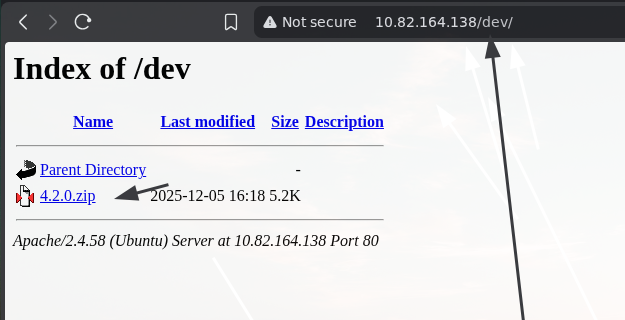
This screenshot shows the /dev/ listing with 4.2.0.zip. That zip file became the entry point for the rest of the box.
When I checked port 9004, it looked like some kind of payload storage or C2 service.
1
2
Payload Storage Malhare's
Version 4.2.0
Looking at the Zip
Inside 4.2.0.zip I found beacon.bin, which looked like the client or beacon for that service.
1
2
$ file beacon.bin
beacon.bin: ELF 64-bit LSB executable, x86-64, dynamically linked, not stripped
Running it showed that it wanted a key before it would do anything useful. I tried a few obvious values, but they all came back with Access denied.
Recovering the Key with GDB
At this point I used gdb because the binary was clearly comparing my input with something hardcoded. Breaking on strcmp let me inspect both strings and read the expected key from memory.
1
2
3
4
5
6
7
8
9
10
11
12
13
(gdb) break strcmp
(gdb) run
Enter key: hi

(gdb) info registers rdi rsi
rdi            0x404140
rsi            0x4022b8

(gdb) x/s 0x404140
0x404140 <username.0>: "hi"

(gdb) x/s 0x4022b8
0x4022b8: "EastMass"
That gave me the key: EastMass.
1
2
3
4
5
$ ./beacon.bin
Enter key: EastMass
Hello EastMass!
Access granted! Starting socket server...
Socket server listening on port 4444...
Once the key worked, the binary opened a socket server on port 4444. That gave me a way to trace how the beacon talked to the rest of the system.
Talking to Port 9004
I first connected to port 9004 by hand to understand the menu. It looked like a small storage service with create, update, delete, and exit options.
1
2
3
4
5
6
7
8
$ nc <TARGET_IP> 9004

Payload Storage Malhare's
Version 4.2.0
[1] C:
[2] U:
[3] D:
[4] E:
After a lot of research, I found a sequence that made the service execute id. I am only keeping the useful proof here and not the full noisy interaction.
1
uid=1000(neo) gid=1000(neo) groups=...
This confirmed command execution as the neo user and gave me my foothold.
Tracing the Beacon
To understand what the local socket server on 4444 actually did, I ran the binary under ltrace. I cut most of the repeated lines and kept only the parts that mattered.
1
2
3
4
5
6
7
8
9
10
11
$ ltrace ./beacon.bin
...
puts("Socket server listening on port 4444...") = 40
...
read(4, "1\n", 1024) = 2
system("/tmp/b68vC103RH") = 32512
...
read(4, "2\n", 1024) = 2
connect(5, ..., 16) = 0
snprintf(..., "GET /7ln6Z1X9EF HTTP/1.1\r\nHost: localhost"...)
send(5, ..., 64, 0) = 64
This told me two important things. Command 1 tried to execute a file from /tmp, and command 2 reached out to localhost:80 for a hidden path.
I verified that behavior by listening on port 80 locally and then sending 2 to the service on 4444.
1
2
$ nc 127.0.0.1 4444
2
1
2
3
4
5
6
$ nc -lnvp 80
listening on [any] 80 ...
connect to [127.0.0.1] from (UNKNOWN) [127.0.0.1] 35460
GET /7ln6Z1X9EF HTTP/1.1
Host: localhost
Connection: close
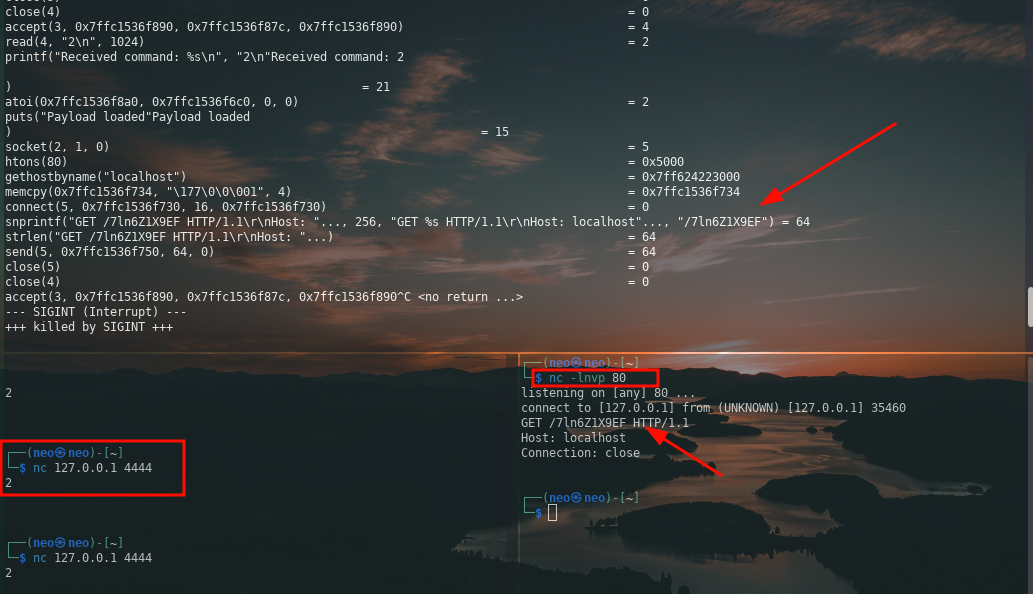
This screenshot shows the exact GET /7ln6Z1X9EF request that appeared after sending 2 to the local socket server. That request exposed the hidden path I needed to check on the target web server.
When I browsed to that path on the target, I found another directory listing with a new archive and a text file.
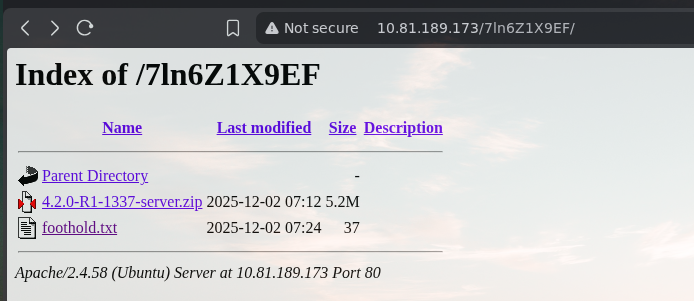
This screenshot shows the /7ln6Z1X9EF/ directory on the target. The important finding here was 4.2.0-R1-1337-server.zip, which moved the exploitation forward.
Using the Server Archive
Inside 4.2.0-R1-1337-server.zip I found the server binary and the matching loader and libc files.
1
2
$ ls
ld-linux-x86-64.so.2  libc.so.6  server
At this point I used the public third-flag write-up as a reference for the exploit chain:
TryHackMe: AoC 2025 Side Quest Two
I am cutting the brute-force noise and not publishing the full private key material. The important result was that the exploit returned the files I needed.
1
2
3
4
5
6
7
$ ls
id_rsa
id_rsa.pub
ld-linux-x86-64.so.2
libc.so.6
server
user.txt
That gave me the SSH material and the user flag, which was enough to continue to the final part of the box.
Next Step
The next step from here was to give read permissions to the device so I could interact with it.
1
agent@tryhackme:~$ sudo /bin/chmod 444 /dev/kagent
That was the setup step that led into the next stage of the challenge.